
What You'll Do
In this section you'll get hands-on with MySQL Studio. You'll navigate the three modalities — SQL Editor, AI Chat, and Notebooks — run queries against a live HeatWave cluster, perform vector similarity searches, and explore GenAI-powered workflows. By the end, you'll be fully comfortable with the interface and ready to build your RAG agent in Part 3.
Run SQL & Inspect Schema
Browse database objects, write and execute SQL, inspect results as tables or charts, and use Explain Plan to understand query execution.
Vector Operations
Generate embeddings, create a vector store, and run similarity searches using HeatWave GenAI's built-in vector processing.
GenAI Queries
Use ML_GENERATE for content generation, ML_RAG for retrieval-augmented answers, and NL2SQL for natural language queries.
MySQL Studio: UI Layout
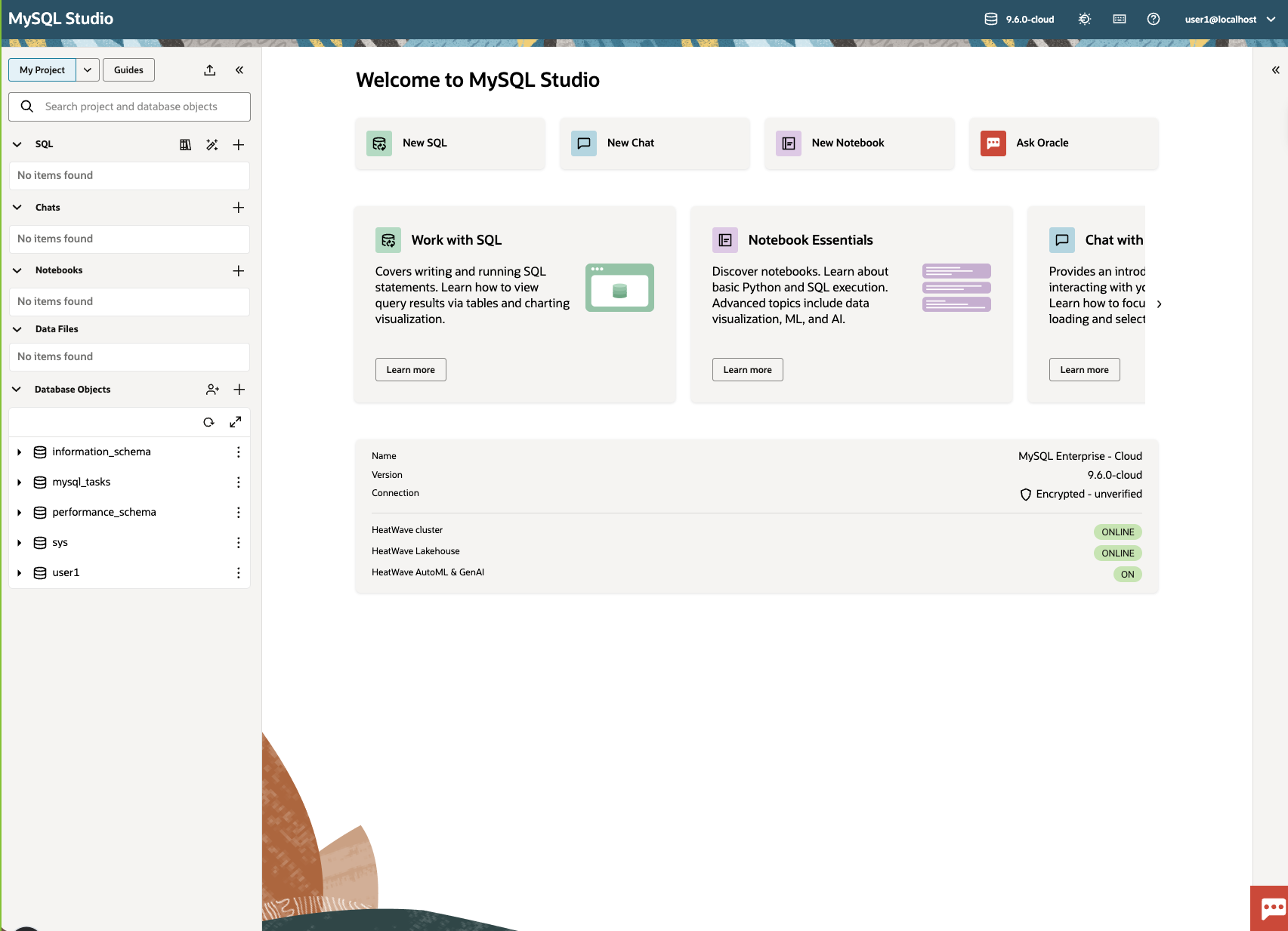
When you open MySQL Studio in the OCI console, you'll see a workspace organized around your current project. Here's the high-level layout of the interface components:
Run SQL & Inspect Schema
Let's start with the basics: connecting to the database, browsing the schema, and running queries.
Setup (already done): create the sample hotels table
We've already created the schema objects you'll use in this exercise. If you need to recreate them (or want to understand what was run), expand the SQL below and execute it in the SQL Editor:
USE <username>; -- change to your username

DROP TABLE IF EXISTS hotels;
CREATE TABLE hotels(
  id INT NOT NULL AUTO_INCREMENT PRIMARY KEY,
  name VARCHAR(255) NOT NULL,
  location VARCHAR(255) NOT NULL,
  price_tier VARCHAR(50) NOT NULL,
  checkin_date DATE NOT NULL,
  checkout_date DATE NOT NULL,
  booked TINYINT NOT NULL DEFAULT 0
);

INSERT INTO hotels(id, name, location, price_tier, checkin_date, checkout_date, booked)
VALUES
  (1, 'Hilton Basel', 'Basel', 'Luxury', '2026-03-22', '2026-03-24', 0),
  (2, 'Marriott Zurich', 'Zurich', 'Upscale', '2026-03-14', '2026-03-21', 0),
  (3, 'Hyatt Regency Basel', 'Basel', 'Upper Upscale', '2026-03-02', '2026-03-20', 0),
  (4, 'Radisson Blu Lucerne', 'Lucerne', 'Midscale', '2026-03-24', '2026-03-25', 0),
  (5, 'Best Western Bern', 'Bern', 'Upper Midscale', '2026-03-23', '2026-03-25', 0),
  (6, 'InterContinental Geneva', 'Geneva', 'Luxury', '2026-03-23', '2026-03-28', 0),
  (7, 'Sheraton Zurich', 'Zurich', 'Upper Upscale', '2026-03-27', '2026-04-02', 0),
  (8, 'Holiday Inn Basel', 'Basel', 'Upper Midscale', '2026-03-24', '2026-04-09', 0),
  (9, 'Courtyard Zurich', 'Zurich', 'Upscale', '2026-03-03', '2026-03-13', 0),
  (10, 'Comfort Inn Bern', 'Bern', 'Midscale', '2026-03-04', '2026-03-16', 0);
Connect to your DB System
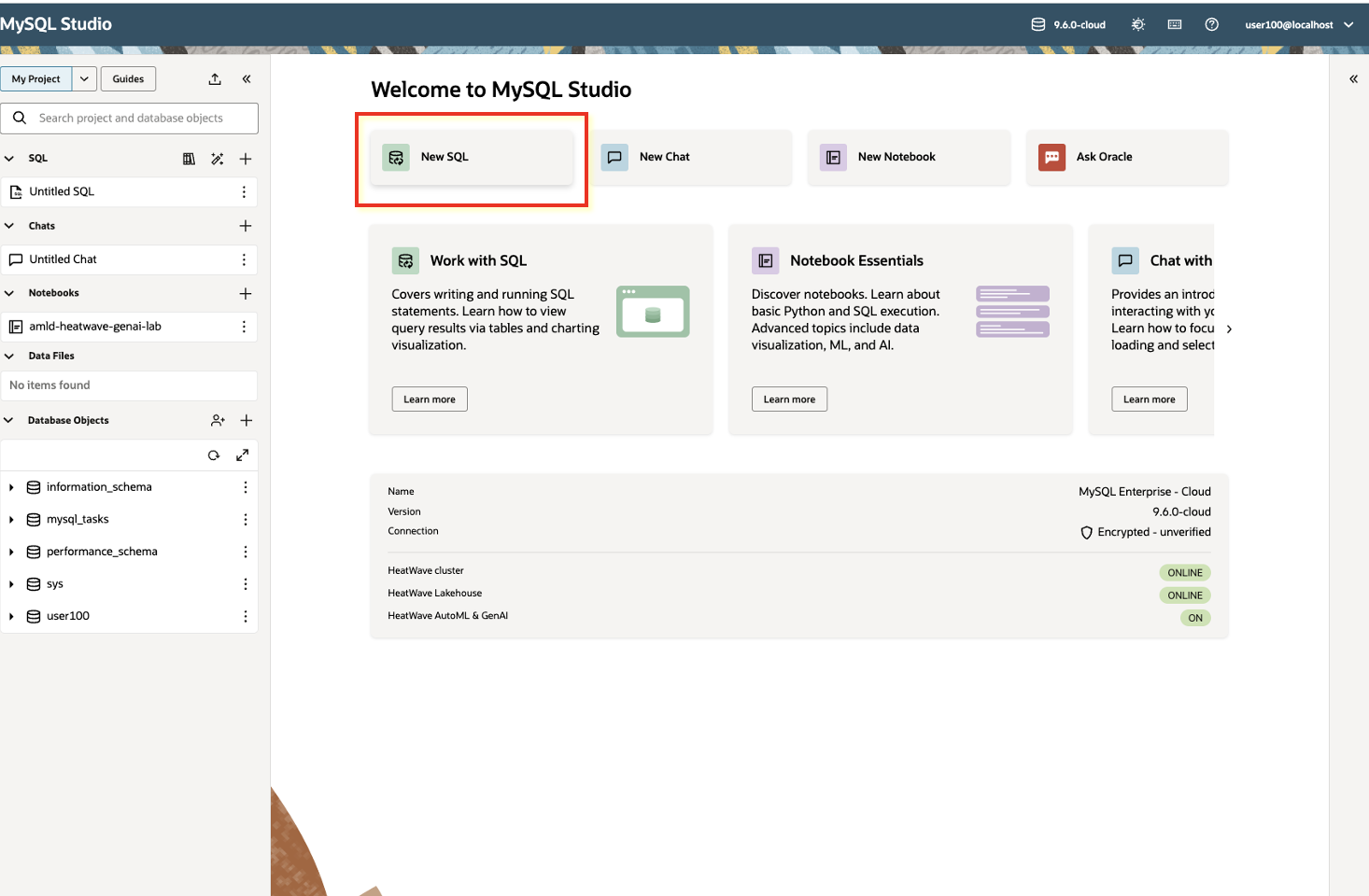
Open MySQL Studio from the OCI Console. Studio automatically connects to your target MySQL DB System. You'll see the schema browser populated with databases and tables on the left panel.
Explore the sample database
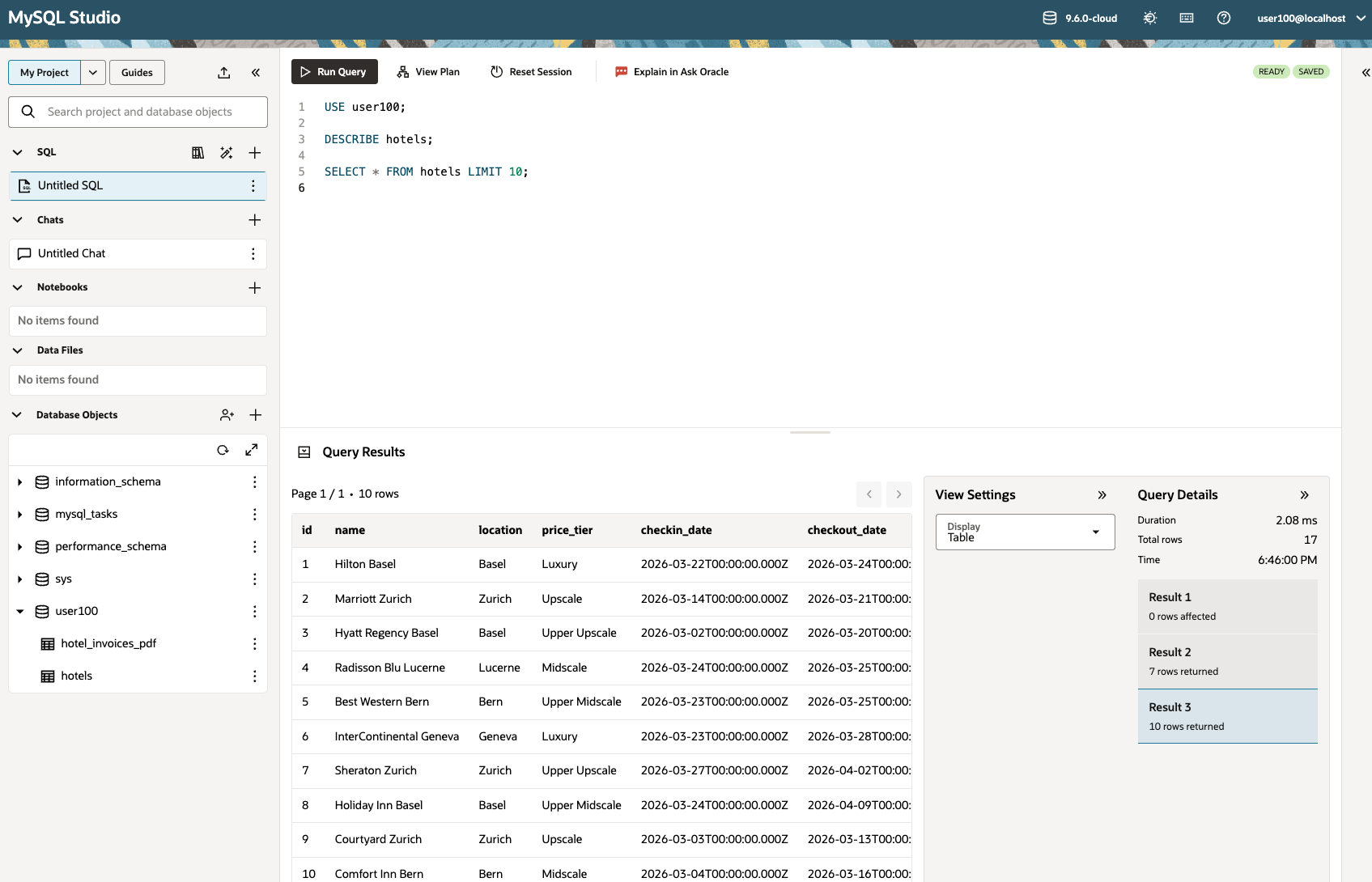
Browse your <username> schema and locate the hotels table, then run the SQL queries below to understand your data.
-- Inspect table structure
DESCRIBE hotels;

-- Quick data peek
SELECT * FROM hotels LIMIT 10;
Run an analytical query
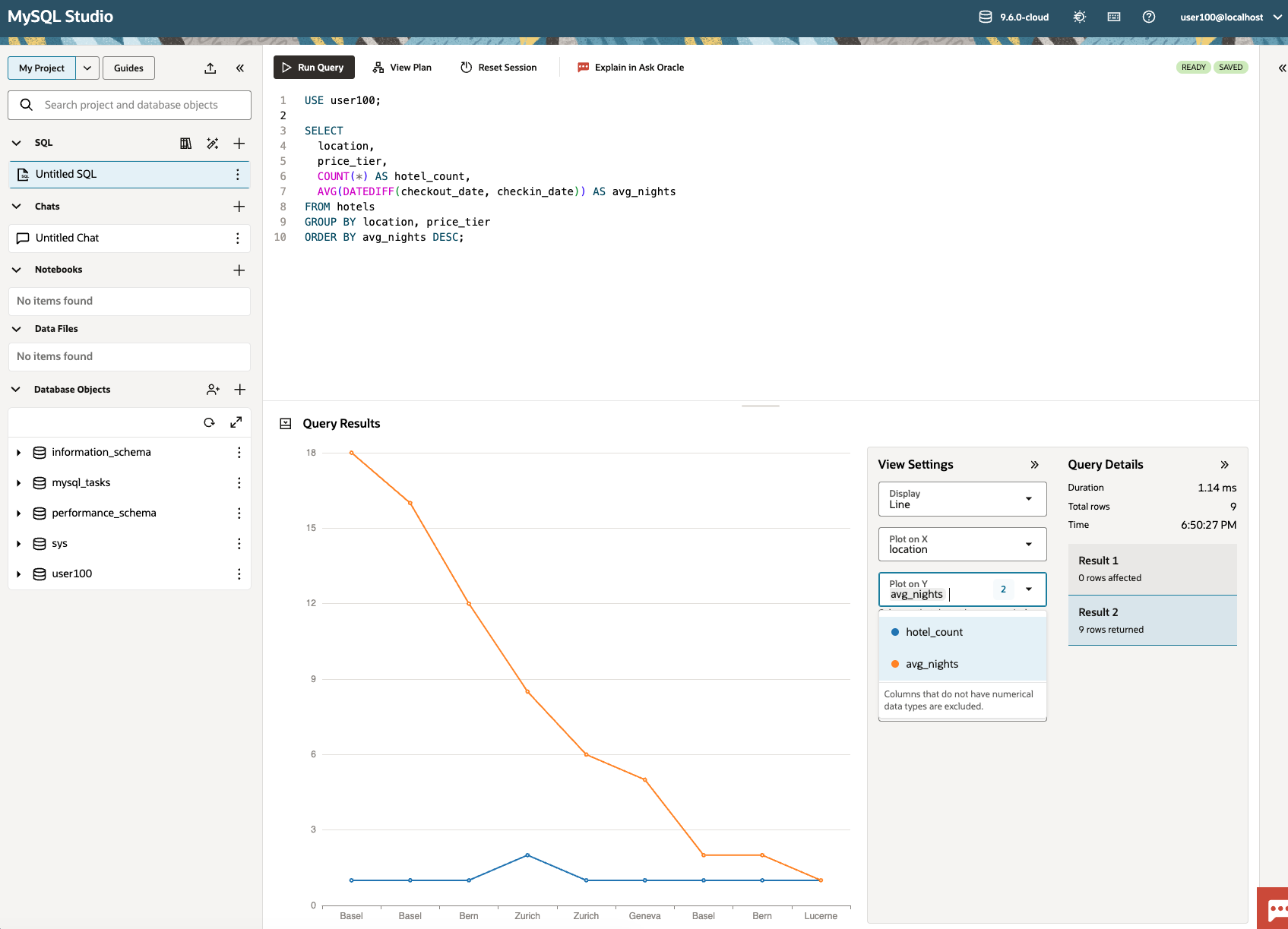
Run a query and observe how HeatWave automatically offloads it to the in-memory cluster. With the integrated data visualization for SQL queries, you can visualize the query results directly in Studio.
-- Average stay length (nights) by city and price tier
SELECT
  location,
  price_tier,
  COUNT(*) AS hotel_count,
  AVG(DATEDIFF(checkout_date, checkin_date)) AS avg_nights
FROM hotels
GROUP BY location, price_tier
ORDER BY avg_nights DESC;
Ingest Your Documents & Create Your Vector Store
Before you can run semantic search, you need to ingest documents, chunk them, generate embeddings, and store them in a vector table.
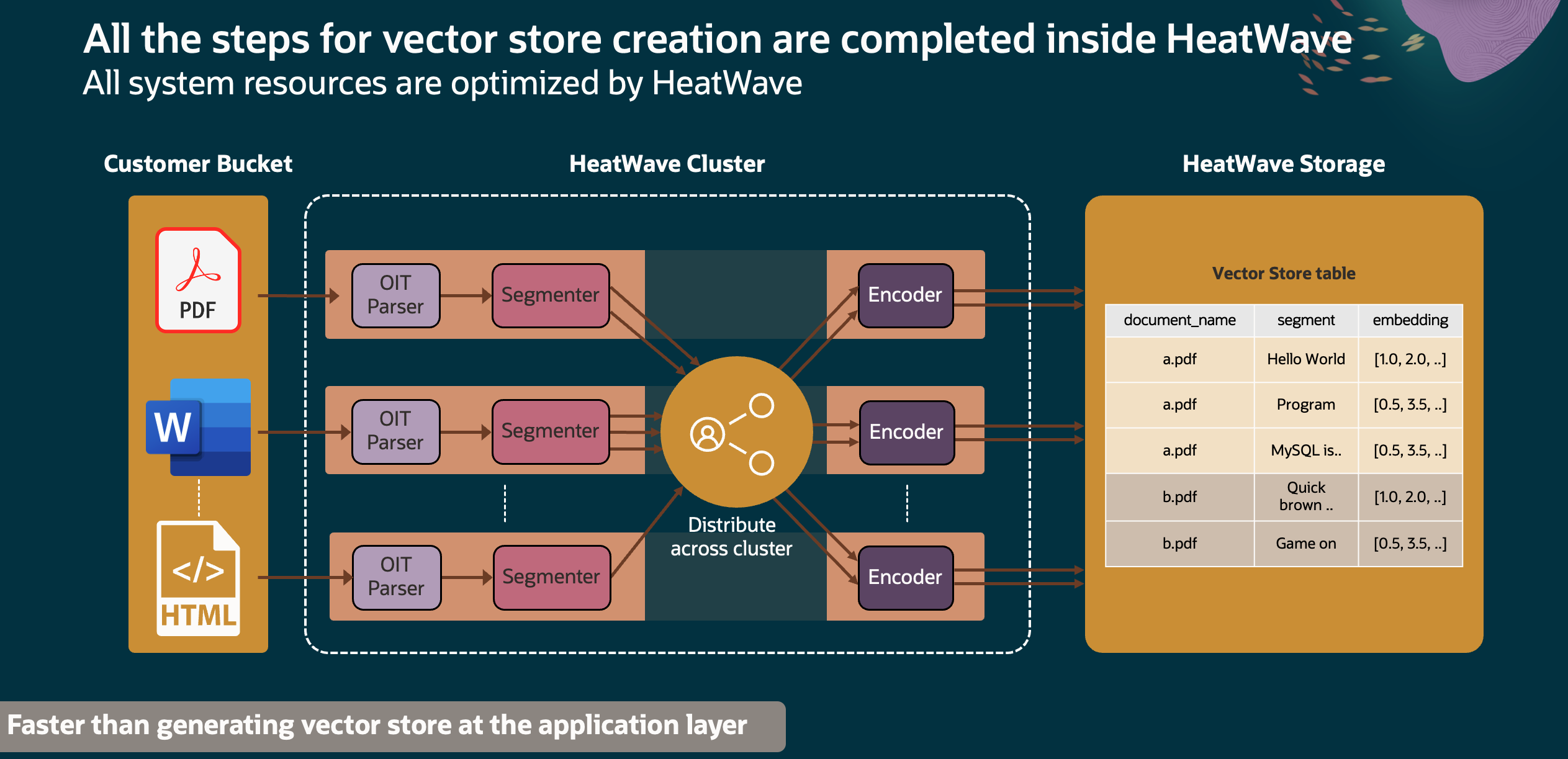
HeatWave makes this workflow fast by parallelizing work across the cluster. In practice, document chunks are processed concurrently: multiple worker processes (and multiple HeatWave nodes) can generate embeddings at the same time, and the resulting vectors are written in parallel into the vector store table. This is what lets you scale from a handful of documents to large corpora without changing your application logic.
Workflow overview
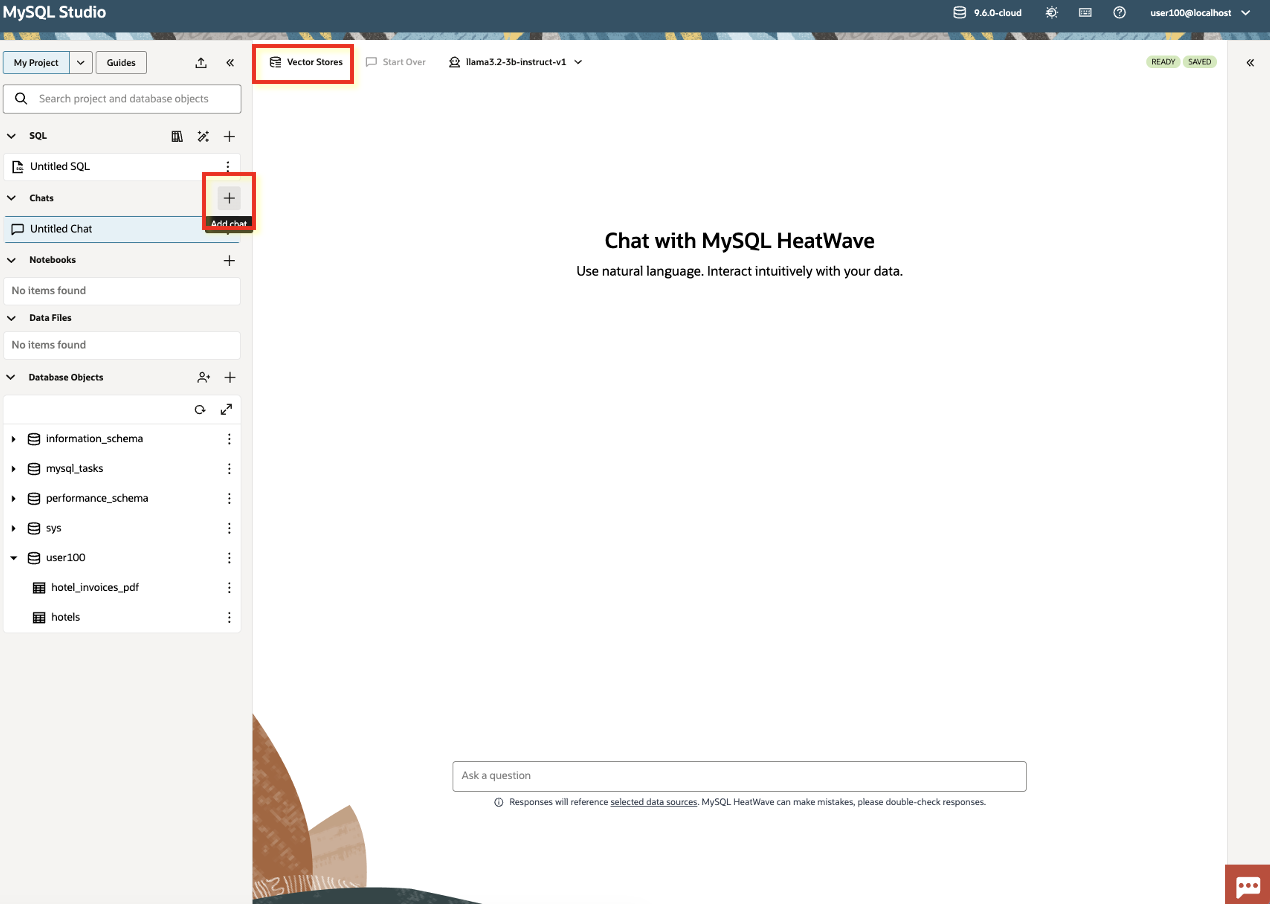
- Open Vector Stores: Let's create a vector store. Switch to the Chat tab and click Vector Stores.
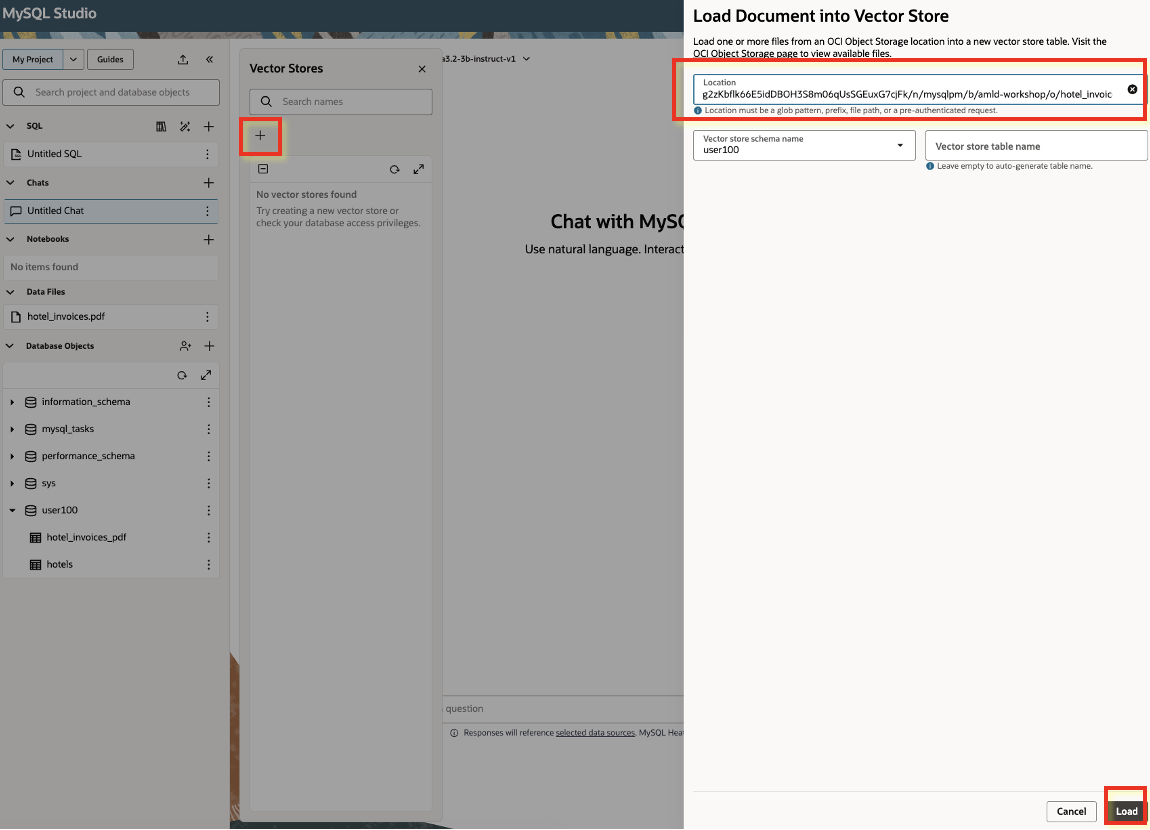
- Provide a document to ingest: Use a Pre-Authenticated Request (PAR) link to let Studio fetch your source document from Object Storage.
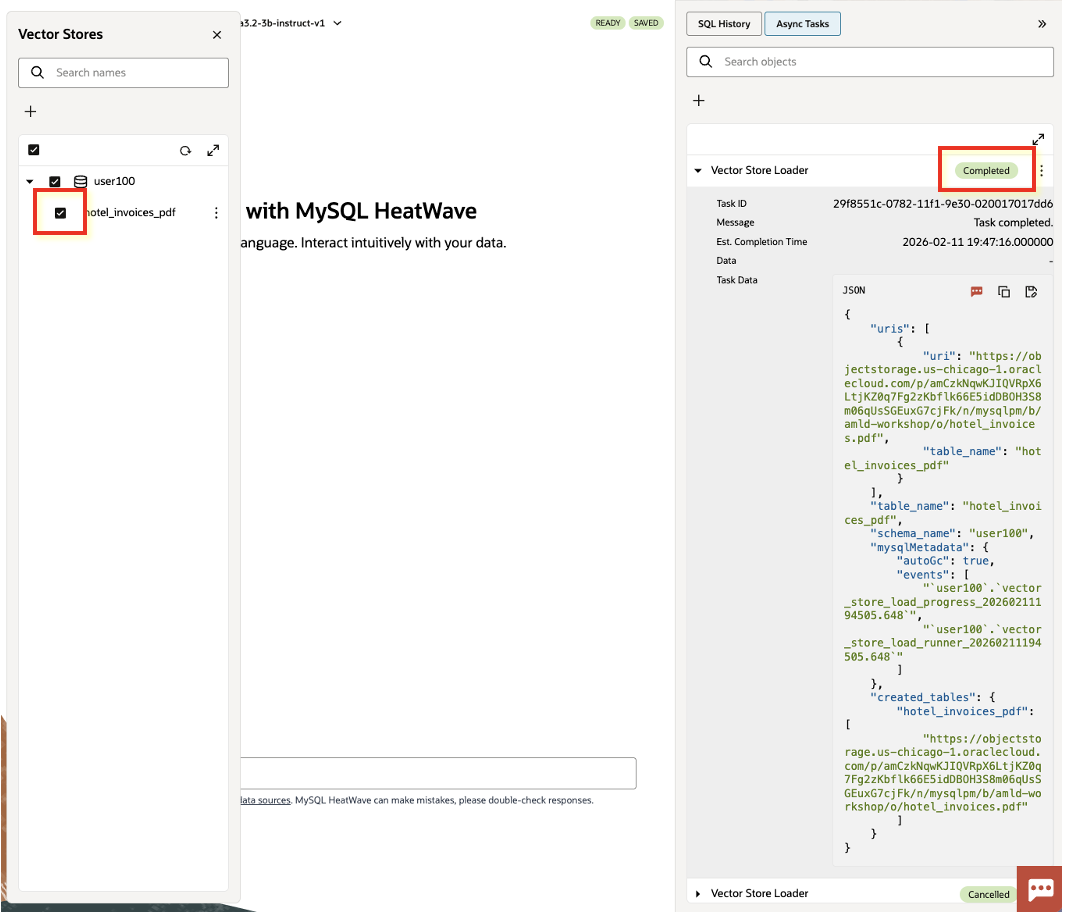
- Create the vector store: Studio ingests the document, chunks it, generates embeddings, and stores everything in your database so you can query it with
DISTANCE()andML_RAG().
To load the document to be ingested, use a Pre-Authenticated Request (PAR). (Reference docs.)
PAR link for this workshop PDF (hotel invoices):
https://objectstorage.us-chicago-1.oraclecloud.com/p/amCzkNqwKJIQVRpX6LtjKZ0q7Fg2zKbflk66E5idDBOH3S8m06qUsSGEuxG7cjFk/n/mysqlpm/b/amld-workshop/o/hotel_invoices.pdf
This PAR gives access to a PDF document of several hotel invoices. We'll create a vector store from this document and store it in our database.
Once the vector store creation is finished, select it as context and start asking questions — Studio will retrieve the most relevant chunks from your document and answer using that context.
Vector Operations & Similarity Search
Why embeddings matter: a PDF invoice segment and your question may use different words (e.g., “breakfast included” vs “meal plan”), but mean the same thing. Embeddings convert text into vectors where semantically similar content ends up close together. That’s what makes semantic search work: instead of matching exact keywords, we search for the nearest vectors.
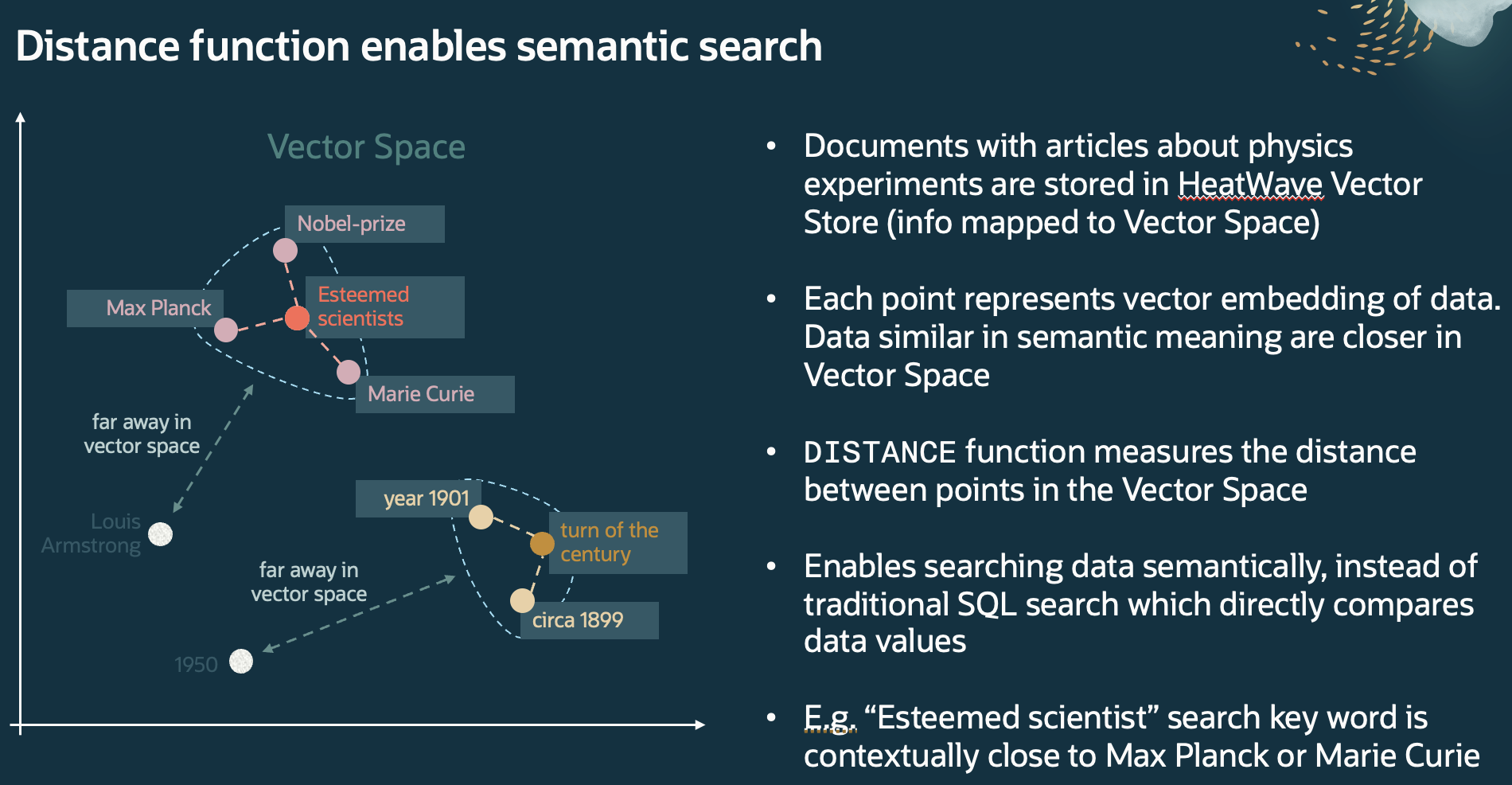
In the previous step, you created a vector store from hotel_invoices.pdf. Now we'll continue by doing the same operations directly in SQL:
generate a query embedding with ML_EMBED_ROW(), then run a similarity search over the vector store table (hotel_invoices_pdf).
Vector store schema (for reference)
hotel_invoices_pdf (
  document_name VARCHAR(1024) NOT NULL,
  metadata JSON NOT NULL,
  document_id INT UNSIGNED NOT NULL,
  segment_number INT UNSIGNED NOT NULL,
  segment VARCHAR(1024) NOT NULL,
  segment_embedding VECTOR(384) NOT NULL,
  segment_metadata JSON NOT NULL,
  PRIMARY KEY (document_id, segment_number)
)
Generate embeddings
Use ML_EMBED_ROW() to turn your natural-language query into a 384-dimension vector (to match the VECTOR(384) column in hotel_invoices_pdf):
-- Generate an embedding vector from text
SELECT sys.ML_EMBED_ROW(
  "Which invoice mentions breakfast being included?",
  JSON_OBJECT("model_id", "multilingual-e5-small")
) INTO @query_vec; Run a similarity search
With the query vector, do a Top-K nearest-neighbor search using DISTANCE() against hotel_invoices_pdf.segment_embedding:
USE <username>;

-- Find the 5 most similar invoice segments
SELECT
  segment,
  DISTANCE(segment_embedding, @query_vec, 'COSINE') AS distance
FROM hotel_invoices_pdf
ORDER BY distance
LIMIT 5;
Tip: If your similarity results look “off”, make sure the embedding model you use in ML_EMBED_ROW() matches the one used when the vector store was created (dimension and model name).
GenAI-Powered Queries
Now let's explore the full GenAI capabilities — content generation, RAG-based Q&A, and natural-language-to-SQL.
LLM Explorer
To find the list of available LLMs in our database you can view the supported models as shown below:
SELECT * FROM sys.ML_SUPPORTED_LLMS;
Example output (click to expand)
+---------------------------+----------------------------------------------+-------------------+---------------------+---------------+
| provider                  | model_id                                     | availability_date | capabilities        | default_model |
+---------------------------+----------------------------------------------+-------------------+---------------------+---------------+
| HeatWave                  | llama3.1-8b-instruct-v1                      | 2025-05-20        | ["GENERATION"]      |             0 |
| HeatWave                  | llama3.2-1b-instruct-v1                      | 2025-05-20        | ["GENERATION"]      |             0 |
| HeatWave                  | llama3.2-3b-instruct-v1                      | 2025-05-20        | ["GENERATION"]      |             1 |
| HeatWave                  | mistral-7b-instruct-v3                       | 2025-05-20        | ["GENERATION"]      |             0 |
| HeatWave                  | all_minilm_l12_v2                            | 2024-07-01        | ["TEXT_EMBEDDINGS"] |             0 |
| HeatWave                  | multilingual-e5-small                        | 2024-07-24        | ["TEXT_EMBEDDINGS"] |             1 |
| OCI Generative AI Service | xai.grok-4-fast-non-reasoning                | 2025-09-25        | ["GENERATION"]      |             0 |
| OCI Generative AI Service | xai.grok-4-fast-reasoning                    | 2025-09-25        | ["GENERATION"]      |             0 |
| OCI Generative AI Service | xai.grok-code-fast-1                         | 2025-09-11        | ["GENERATION"]      |             0 |
| OCI Generative AI Service | openai.gpt-oss-120b                          | 2025-08-28        | ["GENERATION"]      |             0 |
| OCI Generative AI Service | openai.gpt-oss-20b                           | 2025-08-28        | ["GENERATION"]      |             0 |
| OCI Generative AI Service | google.gemini-2.5-flash                      | 2025-08-28        | ["GENERATION"]      |             0 |
| OCI Generative AI Service | google.gemini-2.5-pro                        | 2025-08-28        | ["GENERATION"]      |             0 |
| OCI Generative AI Service | google.gemini-2.5-flash-lite                 | 2025-08-28        | ["GENERATION"]      |             0 |
| OCI Generative AI Service | xai.grok-4                                   | 2025-07-22        | ["GENERATION"]      |             0 |
| OCI Generative AI Service | cohere.command-latest                        | 2025-07-02        | ["GENERATION"]      |             0 |
| OCI Generative AI Service | cohere.command-plus-latest                   | 2025-07-02        | ["GENERATION"]      |             0 |
| OCI Generative AI Service | cohere.embed-v4.0                            | 2025-07-01        | ["TEXT_EMBEDDINGS"] |             0 |
| OCI Generative AI Service | xai.grok-3-fast                              | 2025-05-21        | ["GENERATION"]      |             0 |
| OCI Generative AI Service | xai.grok-3                                   | 2025-05-21        | ["GENERATION"]      |             0 |
| OCI Generative AI Service | xai.grok-3-mini-fast                         | 2025-05-21        | ["GENERATION"]      |             0 |
| OCI Generative AI Service | xai.grok-3-mini                              | 2025-05-21        | ["GENERATION"]      |             0 |
| OCI Generative AI Service | meta.llama-4-maverick-17b-128e-instruct-fp8  | 2025-05-12        | ["GENERATION"]      |             0 |
| OCI Generative AI Service | meta.llama-4-scout-17b-16e-instruct          | 2025-05-12        | ["GENERATION"]      |             0 |
| OCI Generative AI Service | cohere.embed-multilingual-image-v3.0         | 2025-05-12        | ["TEXT_EMBEDDINGS"] |             0 |
| OCI Generative AI Service | cohere.command-a-03-2025                     | 2025-05-12        | ["GENERATION"]      |             0 |
| OCI Generative AI Service | meta.llama-3.3-70b-instruct                  | 2025-01-15        | ["GENERATION"]      |             0 |
| OCI Generative AI Service | meta.llama-3.2-11b-vision-instruct           | 2024-11-13        | ["GENERATION"]      |             0 |
| OCI Generative AI Service | cohere.command-r-08-2024                     | 2024-11-13        | ["GENERATION"]      |             0 |
| OCI Generative AI Service | meta.llama-3.2-90b-vision-instruct           | 2024-11-13        | ["GENERATION"]      |             0 |
| OCI Generative AI Service | cohere.command-r-plus-08-2024                | 2024-11-01        | ["GENERATION"]      |             0 |
| OCI Generative AI Service | meta.llama-3.1-405b-instruct                 | 2024-09-18        | ["GENERATION"]      |             0 |
| OCI Generative AI Service | cohere.embed-english-light-v3.0              | 2023-11-30        | ["TEXT_EMBEDDINGS"] |             0 |
| OCI Generative AI Service | cohere.embed-english-v3.0                    | 2023-11-30        | ["TEXT_EMBEDDINGS"] |             0 |
| OCI Generative AI Service | cohere.embed-multilingual-light-v3.0         | 2023-11-30        | ["TEXT_EMBEDDINGS"] |             0 |
| OCI Generative AI Service | cohere.embed-multilingual-v3.0               | 2023-11-30        | ["TEXT_EMBEDDINGS"] |             0 |
| OCI Generative AI Service | cohere.embed-english-light-v2.0              | 2023-09-08        | ["TEXT_EMBEDDINGS"] |             0 |
| OCI Generative AI Service | ModelEndpointOCID                            | 2025-04-22        | ["GENERATION"]      |             0 |
+---------------------------+----------------------------------------------+-------------------+---------------------+---------------+
Content generation with ML_GENERATE
-- Generate content using the in-database LLM
SELECT sys.ML_GENERATE(
  "Summarize the key benefits of MySQL HeatWave for AI applications in 3 bullet points.",
  JSON_OBJECT(
    "task", "generation",
    "model_id", "openai.gpt-oss-20b"
  )
);
Example answer (click to expand)
- Blazing-fast, in-database analytics – HeatWave processes terabytes of data in seconds, eliminating costly ETL steps and providing near-real-time insights that can be fed directly into AI models.
- Integrated, low-latency ML capabilities – Native SQL extensions (e.g., SCRIPT MODEL, MODEL_EVAL) let you train, tune, and serve machine-learning models inside MySQL, removing the need for separate data-crawling, storage, and compute layers.
- Cost-effective, simplified infrastructure – By keeping data, analytics, and inference in one managed cluster, HeatWave reduces data movement, storage duplication, and operational overhead, cutting both infrastructure and operational expenses for AI workloads.
RAG query with ML_RAG
This is the core GenAI pattern you'll use in your agent. ML_RAG automatically retrieves relevant context from the vector store and generates an augmented answer:
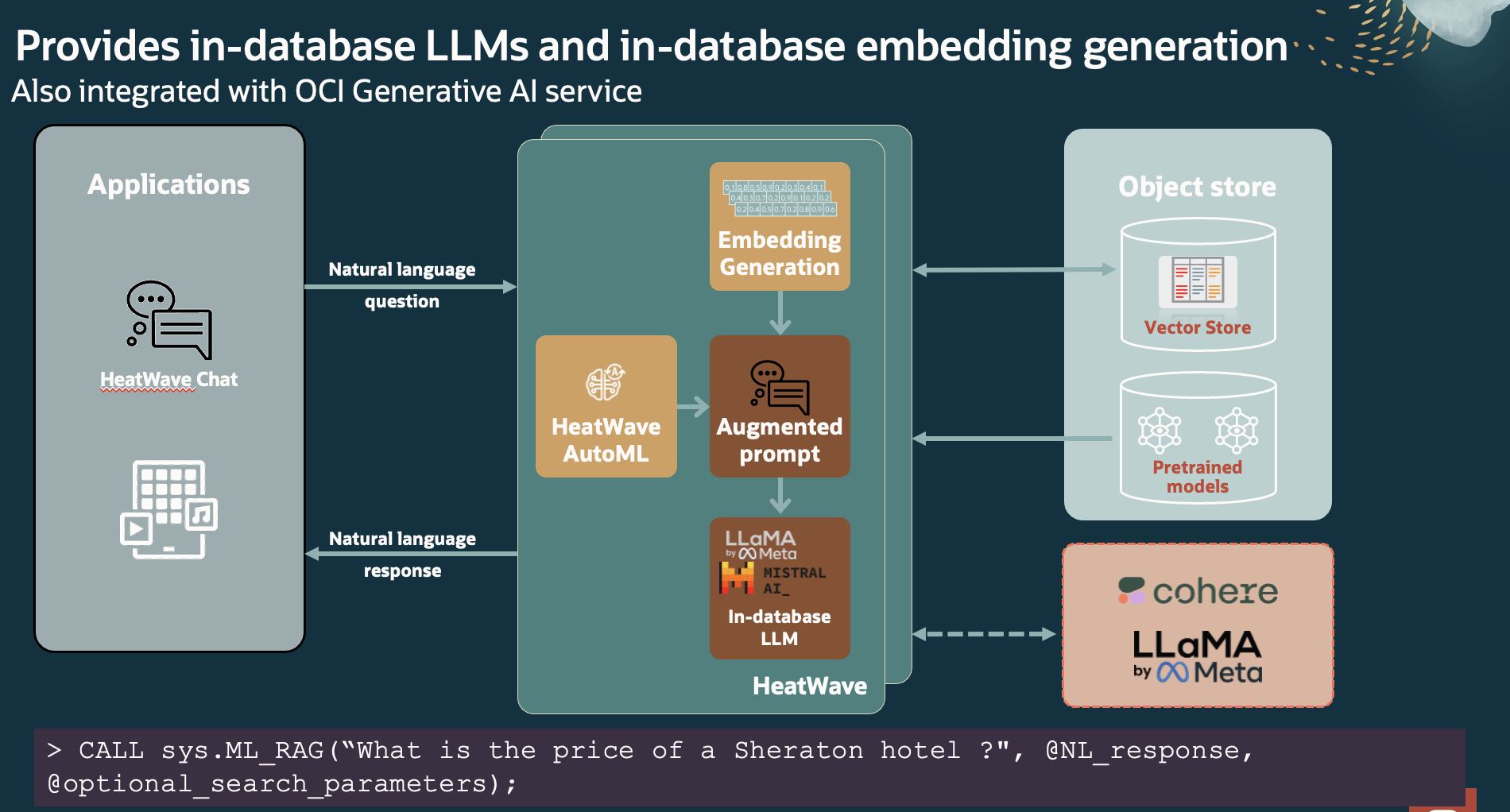
-- RAG: retrieve context from vector store + generate answer
CALL sys.ML_RAG(
  'Which hotels mentions breakfast being included?',
  @output,
  JSON_OBJECT(
    "model_options", JSON_OBJECT("model_id", "openai.gpt-oss-20b"),
    "n_citations", 10
  )
);

SELECT JSON_PRETTY(@output) AS answer;
Example answer (click to expand)
Answer:
Comfort Inn Bern, Hilton Basel Aeschengraben, Marriott Zurich Neumuehlequai, Marriott Zurich Downtown, Best Western Bern, Courtyard by Marriott Zurich Schiffbaustrasse, Hyatt Regency Basel, Radisson Blu Lucerne, Hilton Basel Airport.

Top citations (segment_number, distance):
- 14 (0.2095)
- 0 (0.2150)
- 2 (0.2157)
- 18 (0.2159)
- 8 (0.2175)
- 12 (0.2210)
- 15 (0.2234)
- 4 (0.2255)
- 6 (0.2280)
- 16 (0.2285)

Vector store: `<username>`.`hotel_invoices_pdf`
Ready for the Build Phase
After this tour, you are comfortable with:
- Navigating the MySQL Studio interface — SQL Editor and AI Chat
- Running SQL queries and verifying HeatWave offloading via Explain Plan
- Generating vector embeddings with
ML_EMBED_ROW() - Performing similarity search with the
DISTANCE()function - Using
ML_RAG()for retrieval-augmented generation - Using
ML_GENERATE()for LLM content generation
You're now ready to combine all of these building blocks into a working RAG agent with custom tools.