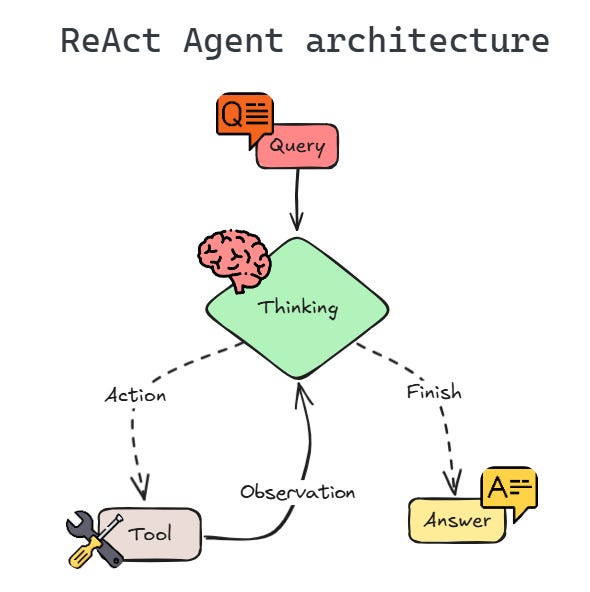
The loop — think → call a tool → observe → answer
This lab uses a ReAct agent powered by HeatWave’s in-database LLM. The mental model is simple: the LLM is the planner, and tools are the hands. Instead of hoping the model “knows” your hotel inventory or invoice pricing, we give it small, reliable functions that can read and write the database (and retrieve documents).
In practice, the agent runs in a loop: it reads your request, decides which tool to call, inspects the tool output, and repeats until it can answer. When this works well, it feels like chatting with a “booking assistant” — but under the hood it’s just structured tool calls + SQL + retrieval.
verbose=True shows you)Connect to MySQL (sanity check)
In MySQL Studio, you already have credentials in the environment. Connect using MYSQL_USER and run a tiny query.
If you see (1,), you’re ready.
Why this matters — every tool call you build later is just “run a SQL statement and return a structured result”. If the connection is flaky, the agent will look unreliable even if your prompts are perfect.
import os
import mysql.connector

mydb = mysql.connector.connect(database=os.environ["MYSQL_USER"])

cursor = mydb.cursor()
cursor.execute("SELECT 1")
print(cursor.fetchone())Create an agent (and watch it fail)
Before building real tools, create a minimal ReAct agent backed by HeatWave’s in-database LLM. We add a placeholder tool, then ask it to book a hotel.
This is a useful “calibration” moment: you’ll see the agent try to be helpful, but it has no way to check availability or persist a booking. That gap is exactly what tools fill.
from mysql.ai.genai import MyLLM

from langchain_classic.agents.initialize import initialize_agent, AgentType
from langchain_core.tools import Tool

myllm = MyLLM(mydb).bind(model_id="meta.llama-3.3-70b-instruct")


dummy_tool = Tool(
    name="Placeholder",
    func=lambda x: "No real tools available yet.",
    description="A placeholder tool that does nothing useful.",
)


agent = initialize_agent(
    llm=myllm,
    tools=[dummy_tool],
    agent=AgentType.ZERO_SHOT_REACT_DESCRIPTION,
    verbose=True,
    return_intermediate_steps=True,
    handle_parsing_errors=True,
    max_iterations=2,
    early_stopping_method="generate",
)

agent.invoke("Book the Hilton Basel for me!")
What does AgentType.ZERO_SHOT_REACT_DESCRIPTION mean?
LangChain uses this setting to run a ReAct-style agent that chooses tools zero-shot.
In other words: it reads the tool descriptions, decides which tool to call,
observes the result, and repeats until it can answer.
Expected behavior — it can’t actually book anything. Without tools, the agent has no way to read availability or update bookings.
Tip — keep verbose=True while developing. It lets you debug:
did the model pick the wrong tool, or did the tool return the wrong data?
Introspect the hotels table
Tools are just functions. To write good tools, we need to know the schema.
In this lab, the agent operates on a hotels table with booking state and optional dates.
Think of the schema as the agent’s “world state”.
If you can answer a question by looking at a row in hotels, then a tool can answer it too.
If you need information that isn’t in the table (like pricing), that’s where the RAG tool comes in later.
id name location booked checkin_date checkout_date import pandas as pd
pd.read_sql("SELECT * FROM hotels LIMIT 10", mydb)| Column | Purpose |
|---|---|
id | Primary key used by tools |
name | Hotel name (e.g. Hilton Basel) |
location | City |
booked | 1 booked, 0 available |
checkin_date / checkout_date | Reservation dates |
Give the agent hands — CRUD tools
Now we create five tools. Each tool has (1) a Python function that runs SQL, and (2) a Tool wrapper with a name and description.
The description is part of your “API” — the LLM uses it to decide which tool to call and how to format the input.
Tool design rule of thumb — keep tools narrow and predictable. Prefer returning JSON (not prose), and let the agent write the narrative.
Search
Find candidate hotels by location or name.
Book / Cancel
Write to the database (set booked to 1 or 0).
Update dates
Parse hotel_id, checkin, checkout and update the row.
Search by location
The agent’s first job is to ground the conversation in real rows.
When a user says “Find me hotels in Basel”, the model shouldn’t guess — it should call a tool that
returns the matching candidates.
That result becomes the context for the next step (choosing an id to book, updating dates, etc.).
def search_hotels_by_location(location):
    location = location.split("\n")[0].strip()
    df = pd.read_sql("SELECT * FROM hotels WHERE location = %s", mydb, params=(location,))
    return df.to_json(orient="records")

search_hotels_by_location_tool = Tool(
    name="Search hotels by location",
    func=search_hotels_by_location,
    description="Search hotels by location.",
)
Why sanitize the input? Tool inputs sometimes include extra text (newlines, commentary). Cleaning the string makes your SQL tools more robust.
What the agent “sees” — it doesn’t see your source code; it sees the tool name and description. That’s why descriptions should include: what the tool does, required inputs, and what it returns.
Try it
tools = [search_hotels_by_location_tool]
agent = initialize_agent(
    llm=myllm,
    tools=tools,
    agent=AgentType.ZERO_SHOT_REACT_DESCRIPTION,
    verbose=True,
    return_intermediate_steps=True,
    handle_parsing_errors=True,
    max_iterations=4,
    early_stopping_method="generate",
)

agent.invoke("Find me hotels in Basel?")Search by name (fuzzy)
Users rarely type the exact hotel name stored in the database. This tool handles “close enough” queries and helps the agent map a request to a specific record.
def search_hotels_by_name(hotel_name):
    # TODO: Implement in the notebook.
passBook a hotel (write)
Booking is the first write action. It should update a single hotel row and fail safely if the booking can’t be applied.
def book_hotel(hotel_id):
    # TODO: Implement in the notebook.
passCancel a booking
Cancel is the “undo” operation. It should revert a booking in the database using a single, explicit update.
def cancel_hotel(hotel_id):
    # TODO: Implement in the notebook.
passUpdate check-in / check-out
This tool updates dates after a hotel is selected. It’s a separate tool because date parsing and validation is a distinct concern from booking.
LangChain tools accept a single string input, so we use a comma-separated contract. The tool description tells the model the exact format.
Why a strict input format? — the easiest way to make agents reliable is to make tool inputs unambiguous. If you later switch to structured tool calling (JSON schema), the same principle applies.
update_hotel_tool = Tool(
    name="Update hotel",
    func=update_hotel,
    description="Update hotel dates. Input: 'hotel_id, checkin_date, checkout_date' (e.g., '7, 2026-04-10, 2026-04-19')",
)
Try a multi-action prompt — “Cancel Hilton Basel and book the Hyatt Regency instead.” A ReAct agent can chain multiple tool calls in one request.
Add RAG — answer pricing questions from invoices
The hotels table has no pricing. But invoices exist as PDFs in object storage.
Load the PDF into HeatWave’s vector store (via the Chats UI), then create a tool that queries those documents.
This is the “story twist” of the lab: your agent can transact in SQL, but it can’t guess a price that isn’t stored in the table. With RAG, you give it a second sense: it can retrieve the relevant part of an invoice and answer with evidence.
Load the invoices into HeatWave vector store
- Open the pre-authenticated request URL from the notebook.
- In MySQL Studio → Chats, load the PDF into HeatWave vector store.
- Ask a pricing question to confirm retrieval works.
RAG tool design — retrieve citations, let the agent answer
Call sys.ML_RAG with skip_generate=true. That returns relevant segments (citations) without a final narrative.
Then the agent reads those segments and produces the final answer.
sys.ML_RAG retrieve relevant invoice chunks Why skip_generate=true? — it separates concerns.
The database retrieves, the agent explains. This makes debugging and citation handling much easier.
-- Retrieve relevant citations (no final generation)
CALL sys.ML_RAG(
  "input string",
  @response,
  JSON_OBJECT('skip_generate', true)
);
SELECT @response;
def rag(question):
# 1) Call sys.ML_RAG(skip_generate=true)
# 2) Parse JSON response
# 3) Return a list of relevant invoice snippets
# (Implemented in the notebook as an exercise)
pass
rag_tool = Tool(
name="Knowledge Base",
func=rag,
description="Useful for looking up hotel invoices.",
)Test prompts
agent.invoke("What is a price of accommodation at Hilton?")
agent.invoke("How much does a hotel room cost on average in the city of Bern?")You now have an end-to-end agent
- CRUD via tools — search, book, cancel, update dates
- RAG via tools — answer pricing questions from invoice PDFs
- All inference in HeatWave — no external LLM API calls
Key takeaway — tool descriptions are part of your “API”. Clear contracts (inputs/outputs) are what make agents reliable.
A good finishing prompt — “Book me an available hotel in Basel for next weekend, then tell me what similar stays cost based on the invoices.” You’ll see the agent combine SQL tools (state) and RAG (knowledge) in a single conversation.